
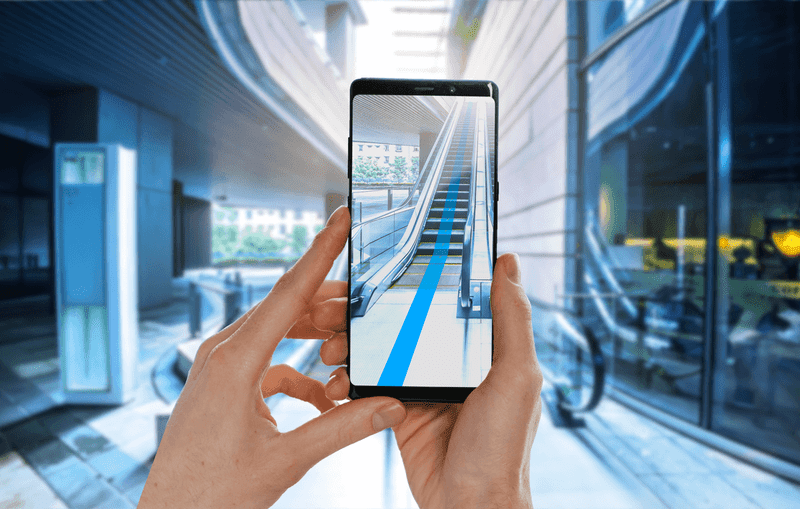
A map can know where you are and still fail you at the worst moment. You step out of a subway station, turn toward the wrong corner, and lose five minutes before the blue dot settles down. Augmented Reality Navigation helps most in that awkward gap between knowing the address and knowing which way your feet should move. That is why the best AR tools are not magic goggles or flashy demos. They are short, practical camera views that tell you, “turn here,” “cross there,” or “the entrance is behind you.” For Americans walking through downtown Chicago, hunting a gate at LAX, or trying to find a clinic inside a large hospital, that small correction matters. Good consumer technology coverage often misses this part: the win is not futuristic spectacle. The win is saving a normal person from standing on a sidewalk pretending they are not lost. This guide looks at where AR guidance earns its space, where it still fails, and how to pick apps that help without turning every walk into screen time.
Where Augmented Reality Navigation Earns a Place on Your Phone
The best phone maps already handle long routes well. They can plan a drive across Texas, route you around traffic in Atlanta, and show transit transfers in Boston without much drama. AR earns its keep in smaller, messier moments. It helps when the map is correct but your body is facing the wrong way. That sounds minor until you are late, tired, carrying bags, or walking in a place where every corner looks alike.
When AR walking directions beat a spinning blue dot
The classic failure happens outside a subway exit. Google Maps or Apple Maps may know you are near the destination, but the first thirty seconds can be clumsy. The blue dot rotates. The arrow points one way, then another. You walk half a block, notice the route recalculates, and turn around with that small public embarrassment every city walker knows.
AR walking directions solve that specific pain. You lift the phone, point it toward buildings and street signs, and the app uses camera context to orient you. It is not meant for a five-mile walk. It is meant for the first turn, the strange fork, or the last block where the address sits behind another entrance.
This is also why live view maps feel more useful in cities than in open suburbs. A downtown block gives the camera plenty to read: storefronts, signs, corners, windows, and landmarks. A wide road near a strip mall gives it less. The non-obvious truth is that AR can feel smarter in a crowded neighborhood than in a simple-looking parking lot, because the camera needs visual clues.
The same pattern shows up on college campuses. A visitor at UCLA or the University of Michigan might know the building name but still miss the right path through lawns, service roads, and side entrances. The map pin is correct. The walking decision is not. AR walking directions can close that gap without making the whole trip feel technical.
Why camera guidance works best in short bursts
The worst way to use AR guidance is to hold the phone up for the whole trip. That drains battery, draws attention, and makes you less aware of scooters, curbs, dogs, and people. A better habit is quick-check navigation. Pull up the camera view, confirm the direction, then put the phone down.
That pattern changes the value of the feature. AR stops being a screen you stare at and becomes a compass you consult. You use it the way a driver glances at a road sign. One look, one decision, then eyes back on the world.
This matters for safety and for dignity. Nobody wants to walk through Manhattan with their arm raised like they are filming a documentary. The best AR walking directions work because they do not ask for constant attention. They reduce doubt, then get out of your way. For a daily tool, that restraint is not a weakness. It is the whole point.
It also protects the feature from its own hype. A tool that promises to guide every step can become annoying after two blocks. A tool that helps at the first corner becomes memorable. You may forget the interface, but you remember not walking the wrong way while the restaurant reservation clock keeps ticking.
The Daily Places Where AR Guidance Stops Feeling Like a Trick
AR navigation still sounds like a tech demo to many people because they picture floating arrows on a street. The better test is less dramatic: does it help in places where signs, floors, doors, and entrances confuse people every day? That is where the feature starts to feel less like a novelty and more like a practical layer over a messy built environment.
Airports, malls, hospitals, and the indoor map problem
Indoor navigation is harder than outdoor routing because GPS weakens inside buildings. A phone may know you are inside an airport but not whether you are near security, baggage claim, or a coffee stand by Gate B12. That is why indoor maps and camera-based hints matter in places with floors, corridors, and repeating hallways.
Indoor wayfinding apps are most useful when the building itself feels like a maze. Think of a traveler at Dallas Fort Worth trying to find a rideshare pickup zone after a delayed flight. Think of a parent in a children’s hospital trying to reach imaging on a different floor. A normal map may show the building. A better indoor guide explains the path through it.
The counterintuitive part is that AR may not be the main hero indoors. The floor plan often does the heavy lifting. AR becomes useful at decision points: which hallway, which elevator bank, which side of the atrium. Indoor wayfinding apps that try to replace signs can become noisy. The ones that support signs can feel calm.
Shopping centers show the same lesson on a smaller scale. A mall directory may say the sneaker store is on Level 2, but that does not tell you which escalator is closest or whether you are facing the right wing. A phone view that points you toward the correct corridor can save a long loop past the food court.
The last 300 feet matter more than the first three miles
Most navigation apps are good at the big route. They can get you from your house to a stadium, campus, mall, or office park. The breakdown comes near arrival. The app says you are there, but “there” might mean the loading dock, the wrong lobby, or a locked side door.
That last stretch is where AR earns trust. A restaurant in a busy Los Angeles plaza may sit behind another business. A dentist’s office in Phoenix may share an entrance with three other suites. A hotel in New York may have a small doorway between larger storefronts. A street address alone does not solve the human problem of finding the actual door.
This is also where smart home and mobile tech trends connect with real habits. People do not want a new app for every errand. They want the map they already open to become sharper at the final moment. The best AR layer does not replace directions. It cleans up the last bit of confusion, which is the part people remember most.
The last 300 feet can also carry emotion. When you are going to a job interview, a court appointment, or a medical visit, being “close” is not enough. You want certainty. That is why arrival guidance can feel more valuable than the long route itself, even though the long route required more math.
Choosing Apps Without Falling for Flashy Features
The useful choices are often boring. For most Americans, the first apps to test are the ones already on the phone: Google Maps and Apple Maps. That does not mean smaller AR tools have no place, especially in campuses, museums, warehouses, resorts, or large events. It means daily value starts with coverage, reliability, and familiar behavior, not the prettiest floating arrows.
Google Maps, Apple Maps, and the apps you already trust
Google’s Lens in Maps and Live View features are strongest where Street View coverage and visual landmarks are strong. The official guidance says the feature works for walking, not moving vehicles, and it depends on device support plus local visual coverage. That explains why it may feel sharp in San Francisco and weaker on a quiet road with few signs. Google’s Lens in Maps guidance is worth reading before you judge the feature after one failed attempt.
Apple Maps takes a similar daily-life path for iPhone users. It offers immersive walking instructions in supported cities and Indoor Maps for many major airports and shopping centers. The appeal is not that Apple makes every street feel like a game. It is that the camera view can help an iPhone user make the first correct turn without swapping apps.
Live view maps should be judged by boring questions. Does the app open fast? Does it recognize the area? Does it switch back to a normal map without friction? Does it help you choose a door, a street side, or a direction? A feature that looks plain but answers those questions beats a beautiful demo that fails outside a convention center.
Smaller apps deserve a look when they own a specific environment. A museum app may know exhibit rooms better than a general map. A resort app may understand shuttle stops, pool entrances, and footpaths. A warehouse or office app may guide staff through areas public apps cannot map. Daily users should separate public navigation from venue navigation instead of expecting one app to master every space.
What to check before you follow an arrow
An AR arrow is still software. Treat it as advice, not command. Before crossing a street, check traffic and signals. Before entering private property, read the sign. Before walking into a parking garage, make sure the route makes sense for a pedestrian. The phone sees parts of the world, not the whole scene.
A simple checklist helps. First, confirm the travel mode is walking. Second, look for the destination name and address, not only the pin. Third, use the camera view at turns and arrival points. Fourth, switch back to the 2D map when the path becomes obvious. That rhythm prevents the feature from becoming a distraction.
There is a quiet lesson here for app makers too. The best interface is not the one that shouts the most. It is the one that gives the right signal at the right second. For users, that means choosing AR guidance that behaves like a helpful local, not a loud tour guide.
Privacy settings belong in the same checklist. A trustworthy app should explain camera access in plain language and let you control location history. If the app buries permissions behind vague screens, think twice. Navigation is personal. It knows where you are, where you are headed, and how often you return.
The Limits That Make Good AR Navigation Better
Every useful map feature has limits. AR is no different. Bad lighting, weak visual coverage, old storefront data, battery drain, and privacy concerns can all shape the experience. The apps that admit those limits often work better than the ones that pretend a camera can solve every location problem.
Battery, privacy, and street-level accuracy
Camera-based navigation uses more power than a normal map glance. It also asks for camera access, which makes some users pause. That pause is healthy. A navigation app should explain why it needs the camera, when it uses it, and how to turn the feature off.
Street-level accuracy can also shift. Construction changes entrances. A business moves across the plaza. A mall remodels one wing. A hospital reroutes visitors through a temporary lobby. The map may still be right in a broad sense while the on-site reality has changed.
That is why AR should be paired with old-school awareness. Read signs. Ask staff. Notice whether a path feels safe and public. The best tech does not remove common sense. It gives common sense better clues. This balance is part of local search and app usability strategy, because the smallest place-data error can become the biggest user frustration.
Weather adds another limit that people learn fast. Rain on the lens, glare on the screen, or a dark block with few lit signs can make camera guidance weaker. The fix is not dramatic. Step under cover, use the regular map, or ask the business for a landmark. A good app should make fallback easy.
Why the best interface sometimes tells you to put the phone down
A great AR navigation app knows when it has done enough. After it points you down the right sidewalk, it should fade into the background. After it confirms the entrance, it should stop demanding your eyes. That is not a lack of ambition. It is respect for the street.
This point matters more as glasses, headsets, and car displays improve. The dream version of AR often imagines constant overlays. Daily life may want the opposite. A parent crossing a Target parking lot with two kids does not need floating labels on every store. They need one clear cue, then open attention.
The future will belong to apps that make the physical world easier to read without covering it up. Useful AR navigation will feel less like a special mode and more like a moment of help. You will call it up, solve the confusion, and return to walking. That is a humble job, but it is the one people come back to.
There is also a social side. People do not want to look lost forever. They want to recover fast and keep moving. The best design respects that quiet wish. It helps without making the user perform their confusion in public.
Conclusion
The most useful map is not always the one with the most features. It is the one that helps at the exact moment doubt starts costing you time. AR guidance works because it handles a human problem that flat maps never fully solved: orientation in the real world. The lasting value of Augmented Reality Navigation is not the drama of arrows floating over city streets. It is the small relief of choosing the correct exit, hallway, entrance, or corner on the first try. For daily life in the U.S., that means city walks, airport transfers, hospital visits, campus trips, and shopping centers where the final steps matter. Use AR in short bursts. Trust it when it confirms what your eyes can check. Question it when the scene feels wrong. The smartest user is not the one who follows every prompt. It is the one who lets the phone clear the fog, then looks up and moves with confidence.
Frequently Asked Questions
What are the most useful AR map features for everyday walking?
The best features are quick camera-based orientation, turn confirmation, landmark recognition, and arrival help. They matter most when you leave a subway station, reach a confusing intersection, or need the correct entrance in a busy plaza.
Are AR walking directions safe to use on busy streets?
They can be safe when used in short checks, not constant viewing. Stop near a safe spot, confirm the next move, then lower the phone. Never cross streets, drive, bike, or walk through crowds while staring at the camera view.
Does Google Maps have AR directions for daily use?
Yes, Google Maps includes Lens in Maps and Live View features for walking in supported areas. They work best outdoors, in good light, and where Street View coverage gives the app enough visual clues to understand your position.
Does Apple Maps support camera-based walking guidance?
Yes, Apple Maps supports immersive walking guidance in selected locations and Indoor Maps for many large airports and shopping centers. iPhone users should check whether the feature appears during walking directions in their city or travel area.
Why do AR map apps fail in some neighborhoods?
They often fail because the app lacks enough visual data, lighting is poor, buildings have changed, or the area has limited street-level coverage. Open spaces, plain parking lots, and roads with few signs can confuse camera-based positioning.
Are indoor wayfinding apps worth using in airports?
They are worth using when the airport is large, the terminal is unfamiliar, or you need a gate, restroom, baggage claim, or rideshare zone fast. They work best when paired with airport signs and staff help, not treated as the only guide.
Do live view maps drain phone battery faster?
Yes, camera-based guidance can drain battery faster than a normal map because it uses the camera, screen, sensors, and location services at once. Use it for turns and arrival checks, then return to the regular map view.
What should I look for before trusting an AR navigation app?
Look for strong coverage in your area, clear walking-mode support, easy switching back to 2D maps, simple privacy controls, and accurate place details. The best app should reduce confusion without asking you to stare at your phone.

Related Posts

AI Video Generation Technology Progress From Sora to Current Competitors

Wearable Health Tech Accuracy Issues That Medical Professionals Warn About